
Scanning Film Negatives for a Searchable Digital Archive
Scanning film negatives is only the first step. The real value appears when those film negatives become digital files that are easy to find, easy to back up, and ready to print or share later.
For many of us, the negative remains the true original. Yet the digital file is what we return to every single time with some exceptions when we want to review old work, prepare a print, or send an image to someone else. When establishing large libraries full of old memories, learning how to convert film negatives to digital is only half the job, the other half is building a system that keeps those files usable for years.
Why scanning film negatives matters
Scanning film negatives practically gives it a second life. It allows you to revisit images over time without repeatedly handling the negative. Additionally, depending on your approach it creates a digital layer that supports editing, proofing, and easy printing.
This is especially important when you shoot regularly. A few scattered rolls are easy to remember. A few years of film negatives are not. Without a proper system in place, even beautiful scans can disappear into vague folder names, and easily can result in duplicates in different places.

Converting film negatives to digital is only the start
Converting film negatives to digital files sounds like the finish line, but in reality it is the handoff point. Once the scan exists, the question becomes whether that file will still make sense to you later, when the details of the shoot are no longer fresh in your mind.
That is why this article sits beside a scanning guide rather than replacing it. The scanning guide explains how to create the file. This piece is about what happens after, when the digital image needs structure, context, and a place to live.
What you need before you start
Before scanning film negatives in bulk, it helps to decide on a simple archive system. That system does not need to be complicated. It only needs to be consistent.
At minimum, that means three things: a clear naming format, a folder structure you can understand later, and a backup habit. The exact scanning setup matters less here than what happens to the files once they are created.
If you already have boxes of old scans with names like final-edit-new or roll1-fixed, do not worry. Most people build a proper system only after they have felt the pain of not having one.
Preparing film negatives for better digital files
Just to be clear, this is not a scanning tutorial, but a small amount of preparation still matters. Dust, scratches, and badly handled film negatives can all reduce the quality of the final file before the archive even begins.
So yes, clean the negatives, handle them carefully, and keep the setup tidy. If you use film negative sleeves for storage, take the negatives out gently and avoid unnecessary handling. The cleaner the scan at the start, the less work it requires before finalising the image and archiving.
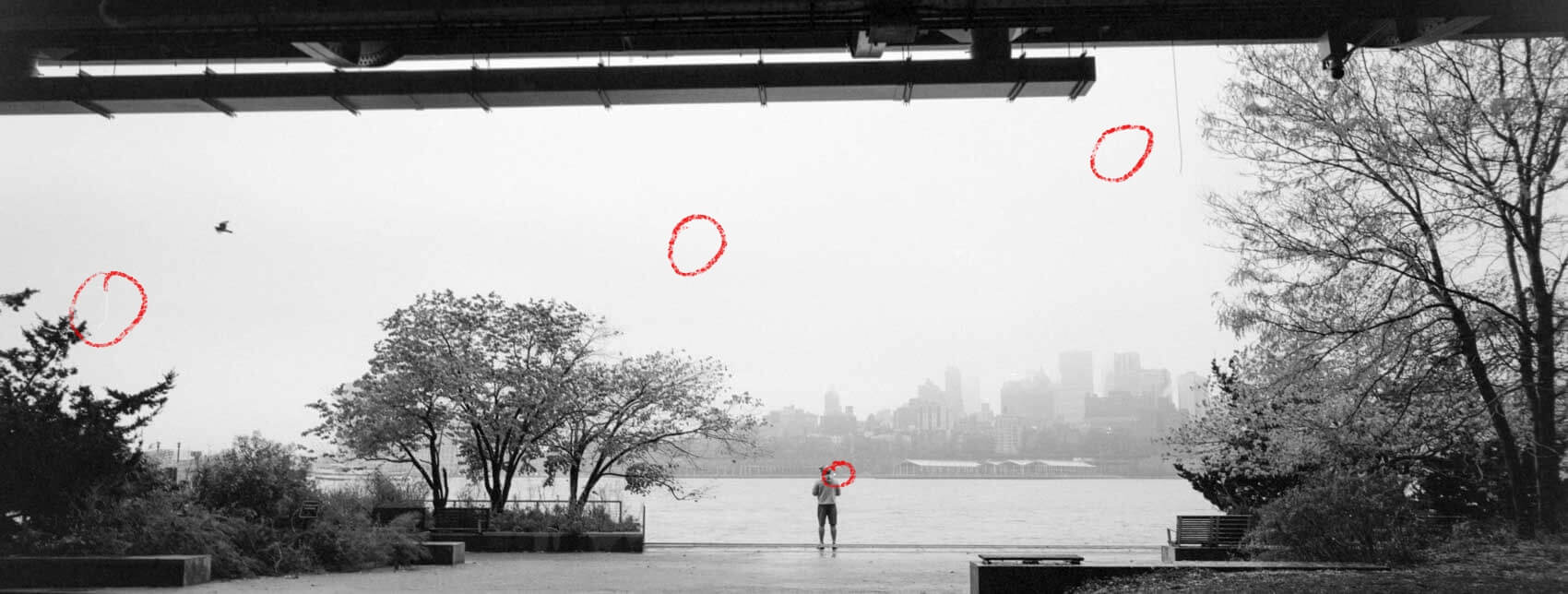
Dust particles on Ilford delta 400 film scans
What quality actually needs to do
When scanning film negatives, it is easy to drift into perfectionism. But the better question is not “What is the absolute maximum quality?” It is “What does this file need to do for me later?”
Some scans only need to function as reference files. They help you review a roll, compare frames, and remember what is there. Other images deserve a stronger master file because they may later become prints, portfolio pieces, or images you will want to edit with more delicately.
“What is the absolute maximum quality?”
That distinction matters. It helps you keep moving, and it stops the archive from becoming so heavy that every roll turns into a major project.
I tend to go for the following rules:
3500px wide jpg when image is just a nice memory
5000px wide or more if image is great
No compression when relevant for print

Bottom left high quality export, bottom right is the low quality export
Naming files so you can find them later
The best archive is often the simplest one. A file name should tell you enough that you do not need to pick up the physical negative to remember what you are looking at.
A practical structure might include the date, film stock, ISO, camera, lens if relevant, roll number, and frame number. Not every photographer needs every variable, but the principle stays the same: name files in a way your future self will understand.
In one of the related blog posts, a naming convention built around film type, ISO, and shoot name is already suggested as a practical baseline. Expanding that to include camera and lens only when needed keeps the system useful without making it cumbersome.
These roll number should then also be reflected in your physical archive.
Folder structure for a searchable archive
Folder structure should serve retrieval, not decoration. A neat archive that makes no sense six months later is not really organised.
The easiest approach is usually to choose one main logic and stick to it. That might be year, project, camera, or film stock. Personally, I would keep the top level broad and the lower levels descriptive, so the archive remains easy to browse without becoming overbuilt. Depending on the size of the project, I will create separate folders in the shoot folder per film stock. However, no matter what I will define the film stock in the image name. This allows all images to at least go by the same naming convention.
What matters most is consistency. If one roll is filed by date, another by camera, and another by location, the archive slowly becomes a guessing game.
File formats and working copies
Not every file needs to play the same role. A larger master file is there for preservation and future flexibility, while smaller images make everyday viewing and sharing easier.
That is where it helps to separate master files from working files and final exports. TIFF is often the safer place for a master. JPEG is perfectly useful for quick previews, contact sheet style review, or sharing online. The important part is not choosing the most impressive format. It is knowing why one file exists and what it is for.
How to store film negatives and their digital copies
How to store film negatives is partly a physical question and partly a digital one. The physical side belongs in a separate preservation workflow, where sleeves, boxes, light, humidity, and long term film negative storage matter most.
Here, the digital side is the focus. If you convert film negatives to digital but keep the files in only one place, you have not really protected the work. A digital archive should backup elsewhere, whether that is another drive or the cloud.
That simple habit protects access to the image even when the unexpected happens. Hard drives fail. Laptops disappear. Folders get overwritten. A second copy is therefor not overkill and can easily be considered part of the archive process.

Why this matters for printing and future work
A strong archive does more than save files. It changes how you work with your photographs later. When a scan is easy to find, it is easier to test for print, compare against older work, or notice patterns in your own way of seeing.
Some images fall apart when printed, while others come alive, and a well kept digital archive gives you the space to make those decisions with more clarity, which matters more than it might seem.
In that sense, scanning film negatives is not just about preservation. It is part of an ongoing relationship with the image within the larger archive. The file is not the end of the analogue process. It is often what allows the image to keep moving and stay relevant over time.
Scanning film negatives creates access. Archiving those scans properly creates continuity and clarity. When your film negatives are supported by a searchable digital system, the work becomes easier to revisit, easier to print, and much harder to lose.
That is the real goal. Not to replace the negative, but to give the image a longer and perhaps more versatile life.


